.png)
Cool Instagram Tricks That You Don't Know Existed!!
- Divyansh Singh

- Apr 30, 2020
- 2 min read
Since The Launch Instagram Is The Most Popular Worldwide photo-sharing Platform On The Planet With Over Billions!! Of Downloads , The Biggest Reason Behind The Success Of Instagram Is, Its Is Very Simple,Easy And Handy To The User But Over The Years Instagram Has Updated A Lot Of Things To Be In The Game. So In This Blog Update I Am Gonna Talk About The Best Instagram Tricks Or Hacks By Which You Can Boast Or Advertise Yourself More ! 😊
1.Disable Activity Status On Direct Messages (DM)
A Time Back Instagram Added A New Feature By Which A User Can See Your Last Seen Of When You Used Instagram (Whatsapp Already Had This Feature From The Very Beginning Of The First Update )

If You Are Like Me You Gonna Hate This But Wait! Thanks To God There Is Way Out To Off This All you need to is go to Profile -> Options -> Show Activity Status and disable it. But This Also Like A KARMA If You Disables Your Last Seen You Also Won't See Anybody Last Seen
2.How To Enable Two Step Verification On Your Instagram Account
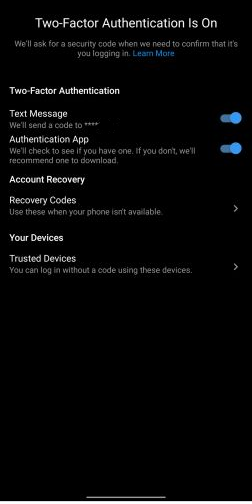
Two Factor Authentication As The Name Defines You Have To Go To The 2nd Step Of Authentication To Log In To Your Account This Is One Of The Best Way To Make Your Account Secure From Crackers Two Step Verification Could Act As A Shield For Your Account To Be Safe From Hacking Attacks
So to enable it, open the Profile section and move to Settings under the hamburger menu. After that, tap on “Security” and choose the Two-factor authentication option. Next, tap on “Get Started” and then choose your desired security method Likes Text Messages, Recovery Codes, Authentication App
3.Saving Instagram Stories
If you have been using Instagram for a while, you know that the service doesn’t allow you to save Stories or even take screenshots without notifying the user. However, there’s a workaround that you can use to save Stories from Instagram easily. To do that on your Android device, first download the Story Saver for Instagram, and then login with your account. Now, the app will show all the Stories which is present on your profile and you can tap on anyone to download them.

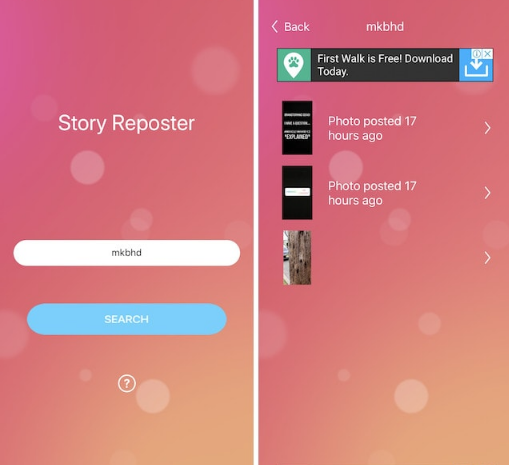
For iOS devices, the process is a little bit different. First, you will need to download the Story Reposter app on iTunes. The app allows you to search for users by their Instagram username and then download any story which is active on their profile.


Comments